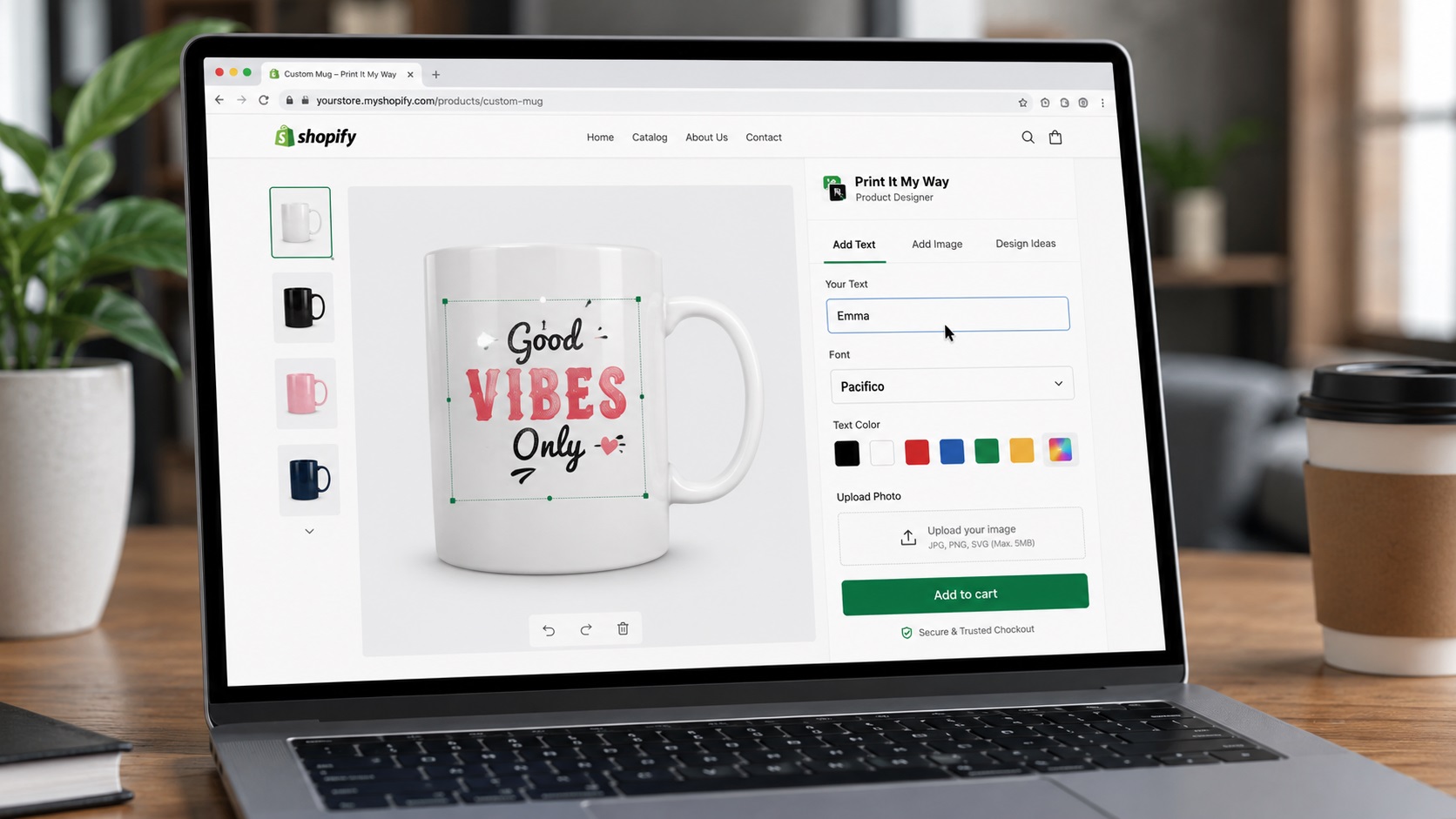
Why swatches + image upload matter together
POD products often combine selected colors (variant or print color) with uploaded photos (pet portrait, family photo, custom design). Apps that handle both well unify the customer flow; apps that handle only one create friction at the intersection.
Visual color swatches convert 15-25% better than text dropdowns. Image upload with HEIC handling and AI background removal converts 20-40% better than basic upload. Apps doing both well outperform apps doing one well.
Step-by-step setup
- Define swatch and upload requirements. Real color swatches or text? Image swatches? HEIC handling? Background removal? Crop tool? Each app handles differently.
- Install Print It My Way (free). Real color swatches, image swatches, photo upload with HEIC + AI background removal. Install from the Shopify App Store.
- Test color swatch visual fidelity. Real color displayed (not text 'Forest Green'). Calibrated to actual printed output.
- Test image upload edge cases. iPhone HEIC, sideways photos, low-res, large files. Each is a potential bug.
- Verify background removal quality. Pet photos, people photos, product photos. AI background removal handles 80%+; manual touchup queue for the rest.
- Test mobile flow. Swatch grid + photo upload + crop tool all need to work cleanly on mobile.
- Verify print-file output. Customer's chosen color + uploaded photo should render correctly into the print file.
Print It My Way (free)
Color swatches: Visual swatches (not text dropdowns), calibrated to print output, 8-12 colors per product typical, eyedropper variant for matching from uploaded photo.
Image upload: HEIC handled with EXIF orientation, AI background removal (default-on for pet portraits and stickers), crop tool with aspect ratio lock, DPI quality checks per product.
Pricing: Free entry tier.
Zepto Product Personalizer
Color swatches and image uploads are core features per their Shopify App Store listing. 4.9 stars, 1,236+ reviews. $9.99/month entry.
Customily
Visual personalization with color and image options. Multi-platform support.
Decision framework
- Free tier needed: Print It My Way
- Highest-rated paid app: Zepto
- Multi-platform commerce: Customily
- AI background removal critical: Print It My Way
Get color swatches + image upload free
Print It My Way ships visual color swatches, HEIC photo upload with EXIF, AI background removal in the free plan.
Install Print It My Way — Free See the color swatches comparison →Frequently asked questions
Are visual color swatches really better than text dropdowns?
Yes — conversion lift of 15-25% typical. Customers see colors in seconds vs imagining 'Forest Green' from text. Mobile especially benefits.
Why does HEIC handling matter?
iPhone photos default to HEIC since iOS 11. Without proper EXIF orientation handling, portrait iPhone photos prints sideways. Affects most iPhone-uploading customers.
Do all customizer apps have AI background removal?
No — varies by app. Print It My Way includes AI background removal by default. For pet portrait products, sticker products, and photo cutouts, this is the highest-impact single feature.
How many color swatches should I offer?
8-12 per product. Below 6 feels limiting; above 12 decision paralysis. Curate to what prints well and sells.
What's the eyedropper feature?
Customer taps a color from their uploaded photo and the design uses that exact color. Useful for matching brand colors or photo elements. Print It My Way supports this.
Is Print It My Way free to install?
Yes. Print It My Way is free to install from the Shopify App Store. The Free plan covers most small stores; paid plans unlock higher order volume, advanced features like Cart Transform per-character pricing, premium fonts, and white-glove support. There is no upfront fee and no credit card required to install.
How long does Print It My Way take to set up?
Most stores set up their first personalized product in under 15 minutes. The Shopify App Store install takes about 60 seconds; adding text fields, photo upload, color swatches, and live preview to a product takes 5-10 minutes. Catalog-wide rollout (50+ products) uses bulk-apply templates and typically takes 30-60 minutes total.
Does Print It My Way work with Shopify Basic, Shopify, Advanced, and Shopify Plus?
Yes. Print It My Way works on every Shopify plan including Basic, Shopify, Advanced, Plus, and Shopify Starter. Some advanced features like Cart Transform (per-character pricing) and B2B company accounts require Shopify Plus, but the core personalization fields, live preview, and order capture work on every tier.
Does Print It My Way slow down my Shopify store?
No. Print It My Way uses Shopify's storefront block architecture, which loads only on personalized product pages and doesn't add render-blocking scripts site-wide. Lighthouse and Core Web Vitals scores on personalized product pages stay green when the app is configured with default settings.
Does Print It My Way work with Printful, Printify, Gelato, and other POD partners?
Yes. Print It My Way has native integrations with Printful, Printify, Gelato, and other major print-on-demand partners. The customer's personalization data flows through Shopify's standard order pipeline, so any partner that reads line-item properties (which all major POD apps do) receives the print files automatically.
Does Print It My Way support Shopify Markets, multiple currencies, and multiple languages?
Yes. Field labels translate per language, upcharge prices can be set per currency, and the personalizer fully supports right-to-left languages including Arabic and Hebrew. The personalizer also handles Unicode for Cyrillic, CJK (Chinese/Japanese/Korean), Greek, and accented Latin characters with appropriate font fallback.