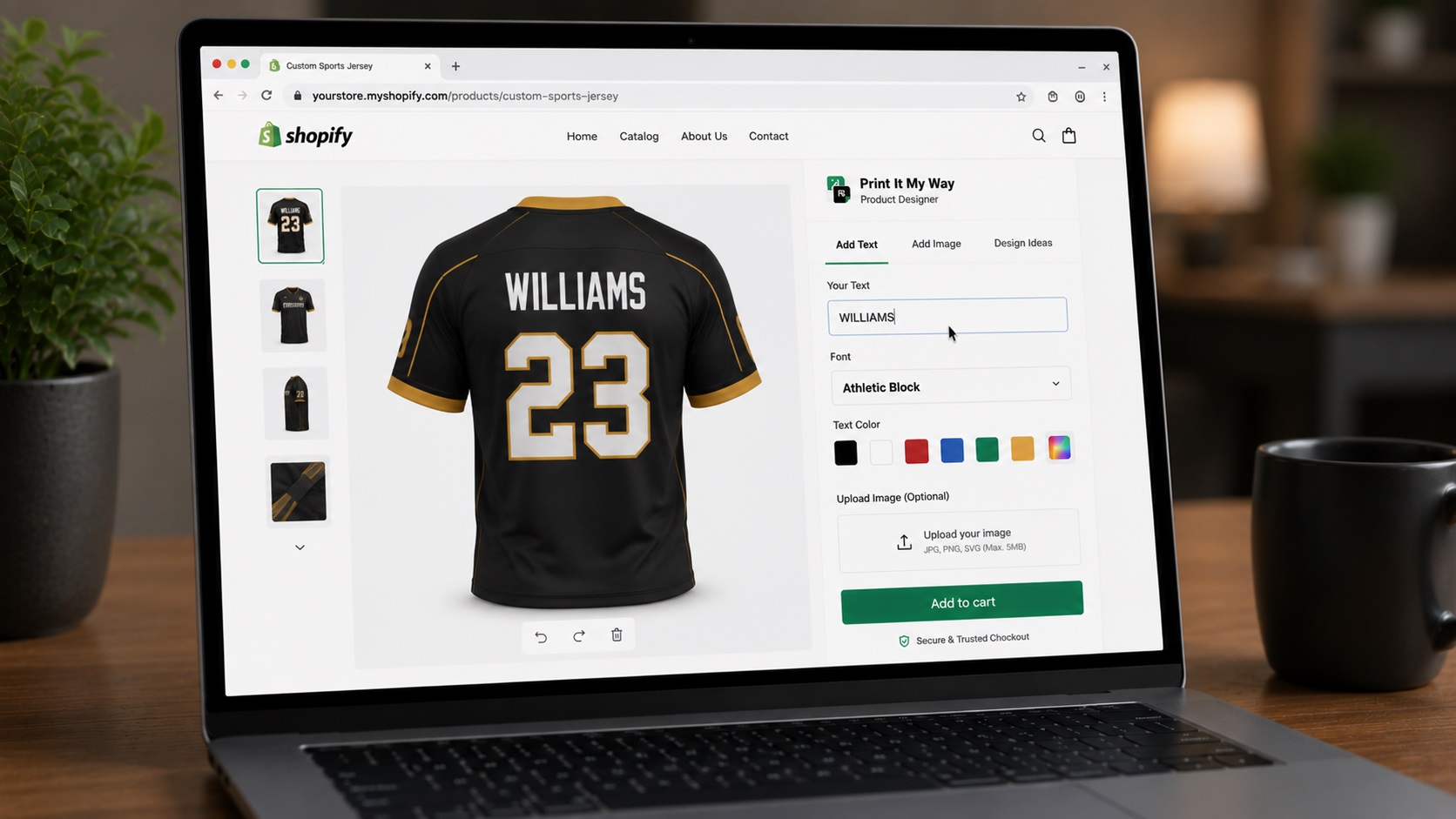
One-paragraph summary
Install Print It My Way (free plan covers this), configure a jersey product with name field (max 12 chars, athletic fonts), number field (max 2-3 digits), crest upload (SVG preferred), team color swatches matching real fabric, and Cart Transform per-jersey pricing ($55-65 typical custom jersey total). For team orders with 10+ jerseys, layer Qstomizer for native CSV roster upload or use Print It My Way's manual per-jersey configuration. Total setup: ~45 minutes for the first product, 1-2 minutes per additional product via bulk-assign.
Step 1: Prep the jersey mockup (5 min)
Get high-resolution front and back jersey mockup images:
- Resolution: at least 1200×1200 pixels for the canvas display
- Format: PNG (transparent background if needed) or JPG
- Design zones to mark out: name area (back upper), number area (back center), front chest, front-bottom hem (for sportswear-specific), back-bottom (sometimes used for sponsor crest)
- Print specs to know: for sublimation jerseys (most common), the print file output is 300 DPI PNG with sRGB color profile. For DTF or screen-print, your POD vendor specifies the format
Source from your POD vendor's template library if you're using Printful, Printify, Apliiq, Inkthreadable, or another vendor. They typically have pre-built jersey mockups with the correct print zones marked.
Step 2: Install Print It My Way (2 min)
- From Shopify admin → Apps → Shopify App Store
- Search "Print It My Way" or install directly via apps.shopify.com/add-on-builder
- Approve standard Shopify permissions
- You'll land in the Print It My Way admin dashboard
- Free plan covers this entire tutorial: no credit card
Step 3: Create the personalizer (5 min)
- Click Create Personalizer
- Name it "Custom Jersey" or similar
- Upload your front jersey mockup as the primary canvas background
- Click Add side and upload the back mockup
- Mark the design zones by dragging rectangles on the mockup:
- Front chest zone: center, ~6×3 inches print area
- Back name zone: upper back, centered, ~10×3 inches
- Back number zone: center back, ~6×6 inches
Customers will see tabs to toggle between front and back as they design. Both designs render in the live preview.
Step 4: Add the name field (5 min)
- Click Add field → Text Area
- Label: "Player Name"
- Assign to: back name zone
- Max characters: 12 (longer names don't fit on a jersey print area)
- Auto-uppercase: enabled (sports lettering is typically uppercase)
- Validation: letters only, optional space and apostrophe
- Font picker: enable, with athletic fonts selected:
- Varsity: classic block sports lettering
- Stadium: modern athletic
- Tahoma Bold: clean sans-serif sports
- Impact: mass-market bold
- Anton: condensed bold
- Roboto Black: modern fallback
- Avoid script/cursive fonts. They don't read at jersey size
- Color swatches: team colors with Pantone references for fabric color matching
Step 5: Add the number field (3 min)
- Add field → Text Area
- Label: "Jersey Number"
- Assign to: back number zone
- Max characters: 2 (most leagues 0-99) or 3 (NBA/NFL allow 100+)
- Validation: numeric only
- Font: same family as name for visual consistency (Varsity Number / Stadium Number)
- Display size: significantly larger than name (numbers should dominate the back)
- Color: typically matches name color
Step 6: Add the crest/logo upload (5 min)
- Add field → Logo Upload
- Label: "Team Crest / Logo (Optional)"
- Allowed file types: SVG (preferred: scales without quality loss), PNG with transparency (acceptable), JPG
- Max file size: 10MB
- DPI validation: minimum 150 DPI at print size
- Default position: front chest zone OR back upper-center (configurable)
- Optional: pre-load common team crests (school logos, league badges) as a "Choose from library" option in addition to custom upload
Step 7: Configure per-jersey pricing (3 min)
Open the Pricing tab and set Cart Transform fees:
| Component | Price |
|---|---|
| Base jersey (covers blank + base decoration) | $39.99 |
| Name fee (when filled) | +$8.00 |
| Number fee (when filled) | +$5.00 |
| Crest upload fee (when uploaded) | +$10.00 |
| Premium font (Varsity, Stadium) | +$2.00 |
| Typical custom jersey total | $55-65 |
Cart Transform handles the math automatically: fees appear as separate clean cart line items, respect discount codes, and flow through to the POD vendor as line item properties.
Optional: team bulk discounts
Set Cart Transform rules for team orders:
- 5-9 jerseys in cart: 5% off total
- 10-14 jerseys: 10% off total
- 15-19 jerseys: 15% off total
- 20+ jerseys: prompt for custom quote via Hulk Form Builder or similar
Step 8: Assign and test (10 min)
- Click Assign to products
- Select your jersey product (or multiple if you have variants by sport)
- Save assignment
- Pick a layout: drawer (most common for jersey designers: keeps the product image visible while designing)
- Open your jersey product page in incognito on mobile and desktop
- Design a test jersey: enter "TEST" as name, "10" as number, upload a sample crest, pick a font, set color
- Verify live preview updates correctly on both front and back tabs
- Add to cart; verify cart shows correct line items with pricing
- Place a draft order from Shopify admin; verify personalization data appears as line item properties
- If you have a POD vendor connected, place a test order to verify the print file generates correctly
Optional: roster upload for team orders
For team managers ordering 10+ jerseys, Print It My Way supports manual per-jersey configuration (add Player 1's jersey, add Player 2's, etc.). For native CSV roster upload, install Qstomizer alongside Print It My Way. Qstomizer is purpose-built for this exact workflow:
- Team manager pastes a CSV with columns: Name, Number, Size
- Qstomizer generates one cart line item per row, pre-configured
- Cart shows N jerseys; team manager applies bulk discount and checks out
For most team-kit stores doing 10-20 jersey orders per team, the manual flow in Print It My Way works fine. For high-volume stores serving leagues (50+ jerseys per order), Qstomizer's native CSV upload saves materially.
Going further
- Multi-side designs (front + back + sleeve): Print It My Way supports up to 4 design zones per personalizer. Add sleeve zones if your jerseys have sleeve number/crest spots.
- Decoration method selector (DTG vs DTF vs sublimation vs embroidery): add a dropdown so customers pick the decoration method. Each method has different cost (DTG cheapest, embroidery premium), set Cart Transform pricing per method.
- Size and gender variants as Shopify variants: handle size (S/M/L/XL/2XL) and gender (men's/women's/youth) as native Shopify variants on the jersey product. Personalization happens on top of the variant selection.
- POD vendor: Inkthreadable (UK sports focus), Apliiq (US sports + apparel), Printful (premium global), Custom Ink (US team kits). For local-fast fulfillment, find a regional sportswear printer.
Build your jersey personalizer in 45 minutes
Print It My Way's free plan covers your first jersey product end-to-end. Free, no credit card.
Install Print It My Way. Free Read the full sportswear use-case guide →Sources & further reading
Primary sources referenced in this article. We link to official platform documentation and standards bodies rather than secondary summaries so you can verify claims directly.