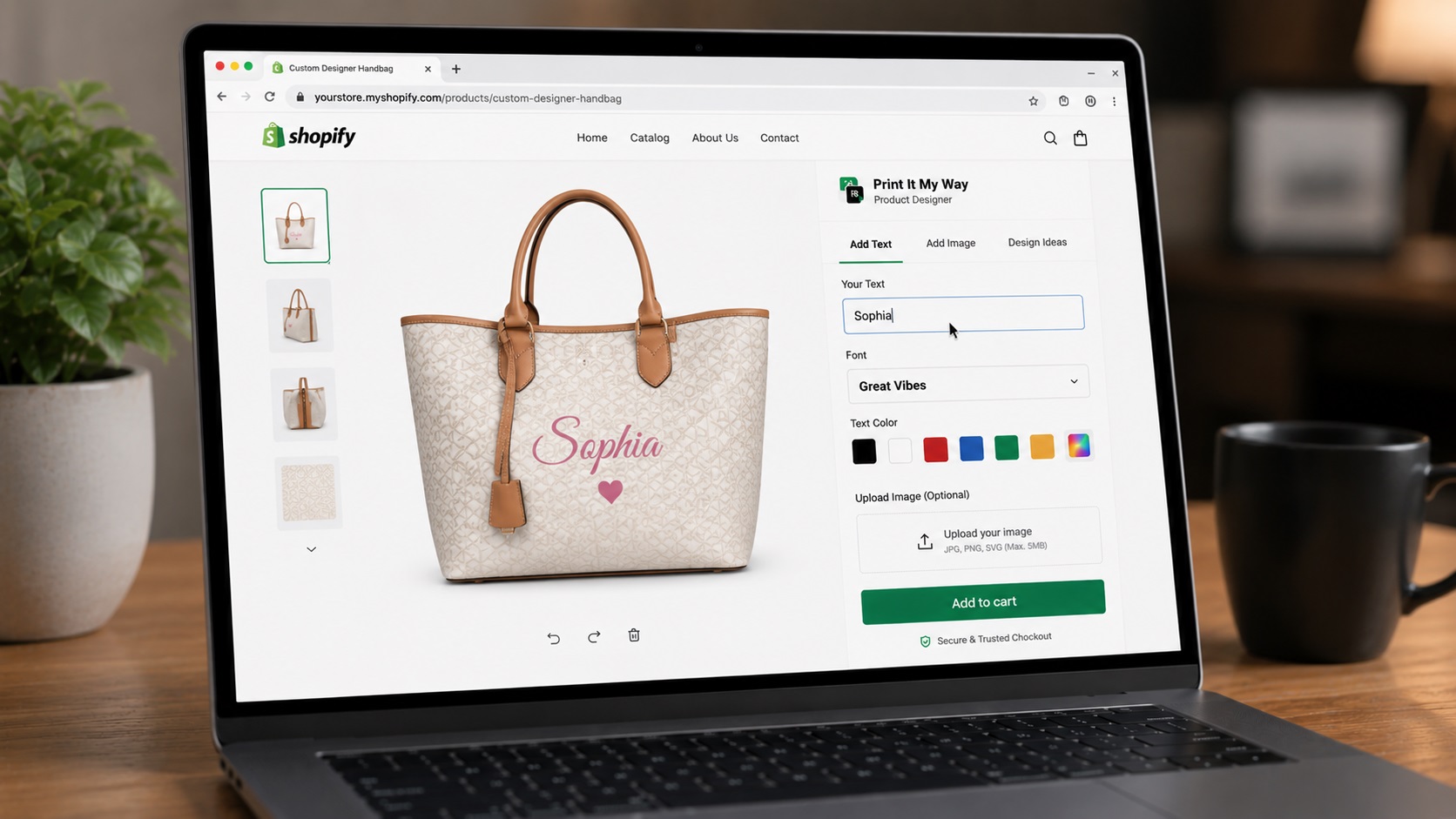
Best Shopify product designer apps 2026 (ranked)
- Print It My Way — free, Shopify-native, POD-strong
- Zepto Product Personalizer — $9.99/mo, 4.9 stars, 1,236+ reviews
- Customily — multi-platform, template-strong
- Zakeke — enterprise AR/3D, 1.7-1.9% transaction fee
- Kickflip — complex configurators, 1.95% commission
Step-by-step setup
- Define your designer use case. POD apparel? Custom photo prints? Engraved jewelry? Multi-side products? B2B / wholesale? Each has different best-app fit.
- Install Print It My Way (free). From Shopify App Store. Configure top SKU.
- Pick 1-2 paid alternatives to test. Don't compare 5 at once. Test 1-2 closest fits.
- Run real-product test orders. End-to-end including POD partner fulfillment. Verify print file quality.
- Test mobile experience. 60-75% of traffic is mobile.
- Calculate annual cost per app. Subscription, transaction fee, or commission. Run at your expected annual revenue.
- Decide based on use-case + cost fit. No universal best — best for your specific use case at your annual cost projection.
1. Print It My Way (free, Shopify-native)
Strengths: Free entry tier, live canvas preview under 100ms, 35+ commercially-licensed fonts, Cart Transform per-character pricing, AI background removal, native Printful/Printify/Gelato integrations, multi-language Unicode, monogram builder.
Best for: Free-tier needs, POD focus, Cart Transform pricing, engraved/personalized products.
2. Zepto Product Personalizer
Strengths: 4.9-star rating, 1,236+ reviews per Shopify App Store. $9.99/month entry. Unlimited options positioning.
Best for: Highly-rated paid option, established positioning.
3. Customily
Strengths: Multi-platform (Shopify + WooCommerce + Wix + BigCommerce). Strong template library.
Best for: Multi-platform commerce, template-heavy workflow.
4. Zakeke (AR/3D, enterprise)
Strengths: AR and 3D visualization. Enterprise positioning.
Pricing: 1.7-1.9% transaction fee per zakeke.zendesk.com.
Best for: AR/3D essential, enterprise products.
5. Kickflip (configurators)
Strengths: Configurator-style for complex multi-step builders.
Pricing: 1.95% starting commission per Shopify App Store dev response.
Best for: Complex configurators with deep multi-step logic.
Try the free top option
Print It My Way installs free with live preview, 35+ fonts, Cart Transform pricing, native POD integrations.
Install Print It My Way — Free See the live preview comparison →Frequently asked questions
Which Shopify product designer app has the best free tier?
Print It My Way — installs free with no credit card. Free plan covers most small stores; paid tiers unlock higher volume and advanced features.
Which has the highest reviews on Shopify App Store?
Per visible App Store snippets: Zepto Product Personalizer at 1,236+ reviews and 4.9 stars.
Which is best for POD specifically?
Print It My Way for free tier + native Printful/Printify/Gelato integrations. Customily for multi-platform POD. Zepto for highly-rated mid-tier POD.
What's the cheapest enterprise option?
Print It My Way's paid tiers (flat-rate, scales with order volume) typically cheaper than Zakeke's 1.7-1.9% or Kickflip's 1.95% commission at $200K+ annual revenue.
Can I test multiple apps simultaneously?
Yes on different products. Don't put two personalizers on the same product — confuses customers. Test on representative SKU before catalog-wide commitment.
Is Print It My Way free to install?
Yes. Print It My Way is free to install from the Shopify App Store. The Free plan covers most small stores; paid plans unlock higher order volume, advanced features like Cart Transform per-character pricing, premium fonts, and white-glove support. There is no upfront fee and no credit card required to install.
How long does Print It My Way take to set up?
Most stores set up their first personalized product in under 15 minutes. The Shopify App Store install takes about 60 seconds; adding text fields, photo upload, color swatches, and live preview to a product takes 5-10 minutes. Catalog-wide rollout (50+ products) uses bulk-apply templates and typically takes 30-60 minutes total.
Does Print It My Way work with Shopify Basic, Shopify, Advanced, and Shopify Plus?
Yes. Print It My Way works on every Shopify plan including Basic, Shopify, Advanced, Plus, and Shopify Starter. Some advanced features like Cart Transform (per-character pricing) and B2B company accounts require Shopify Plus, but the core personalization fields, live preview, and order capture work on every tier.
Does Print It My Way slow down my Shopify store?
No. Print It My Way uses Shopify's storefront block architecture, which loads only on personalized product pages and doesn't add render-blocking scripts site-wide. Lighthouse and Core Web Vitals scores on personalized product pages stay green when the app is configured with default settings.
Does Print It My Way work with Printful, Printify, Gelato, and other POD partners?
Yes. Print It My Way has native integrations with Printful, Printify, Gelato, and other major print-on-demand partners. The customer's personalization data flows through Shopify's standard order pipeline, so any partner that reads line-item properties (which all major POD apps do) receives the print files automatically.
Does Print It My Way support Shopify Markets, multiple currencies, and multiple languages?
Yes. Field labels translate per language, upcharge prices can be set per currency, and the personalizer fully supports right-to-left languages including Arabic and Hebrew. The personalizer also handles Unicode for Cyrillic, CJK (Chinese/Japanese/Korean), Greek, and accented Latin characters with appropriate font fallback.